
Download The Print Shop – desktop publishing software for Mac
Overview
The Print Shop is a user‑friendly desktop publishing application designed specifically for macOS. Developed by the veteran software house Broderbund, this tool lets home‑users, hobbyists, and small‑business owners create professional‑looking cards, calendars, DVD cases, photo books, and a host of other printed projects without needing to master complex design suites like Photoshop or QuarkXPress. Version 2 expands the original classic with a richer template library, tighter integration with Apple’s iLife suite (iTunes, iPhoto, iDVD), and a refreshed Photo Workshop editor that offers quick fixes, special edges, and transparent effects. Whether you’re assembling a family holiday card, printing a set of custom CD labels, or designing a full‑size poster calendar, The Print Shop provides a streamlined workflow that guides you from concept to print‑ready file in just a few clicks.
The software ships with more than 9,500 ready‑made templates spanning nostalgia, sport, family, and business themes. Over 19,500 premium images and graphics are bundled, alongside 240 high‑quality fonts—100 of which are new in this edition. The layout engine now includes rulers, guides, grids, and a “snap‑to” function, giving you pixel‑perfect control while still feeling approachable for beginners.
The inclusion of a built‑in Photo Workshop means you can adjust exposure, add artistic borders, or apply transparency effects without leaving the application. Thanks to direct drag‑and‑drop from iPhoto and seamless iTunes track import, creating album covers, playlists, and photo‑rich greeting cards is effortless. The Print Shop may not replace an industry‑grade DTP package, but for most domestic and small‑office projects it hits the sweet spot between power and simplicity.
Key Features & Installation Guide
What makes The Print Shop stand out?
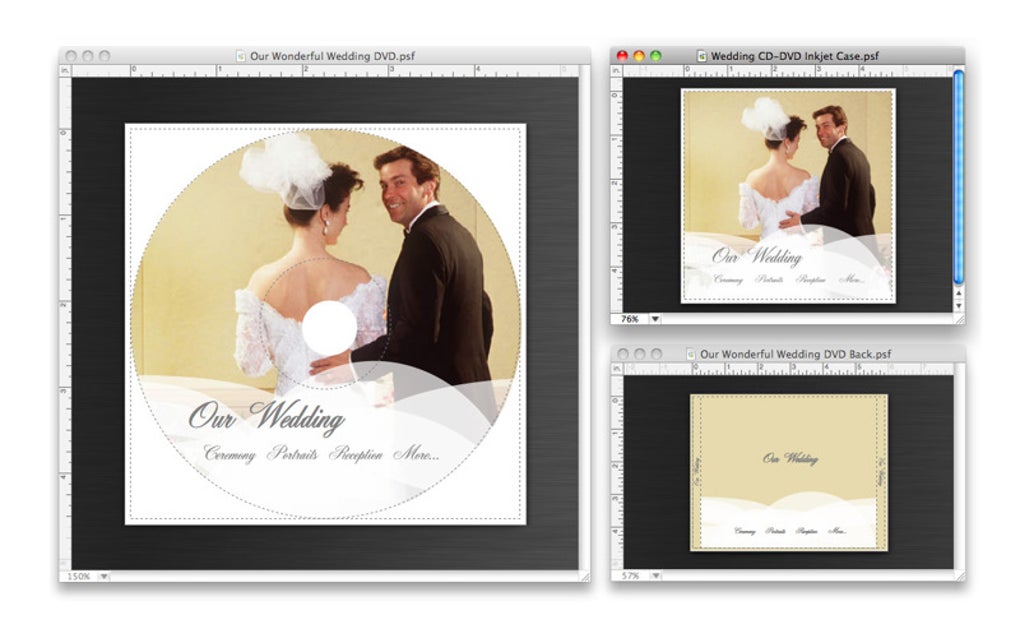
- More than 9,500 professionally designed project templates, including DVD cases, multipage booklets, and iDVD‑compatible themes.
- 19,500+ premium images and graphics, plus 240+ fonts (100 new in Version 2).
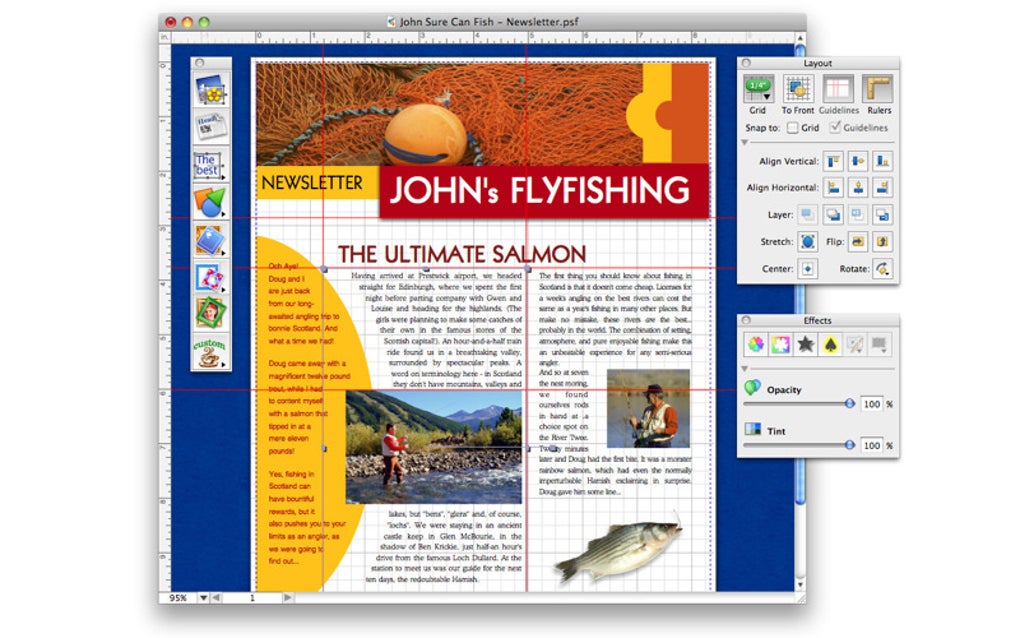
- Powerful layout tools: rulers, grids, guidelines, and “snap‑to” alignment for precise positioning.
- Live transparency and tint settings that update instantly on the design desk.
- Photo Workshop – an integrated editor with special edges, transparent effects, and quick‑fix tools.
- Full iLife integration: import photos from iPhoto, tracks from iTunes, and calendars from iCal.
- Support for two‑sided (duplex) printing and label‑free CD printing on compatible HP, Epson, and Canon printers.
- Expanded CD label brand support (Avery, Memorex, NEATO, CD Stomper) and “nudge” precision alignment.
- Spotlight importer for locating existing .tps project files quickly.
- Comprehensive user guide (PDF) accessible from the Help menu.
Step‑by‑step installation and first‑run usage
Downloading and installing The Print Shop on a Mac is straightforward. Begin by obtaining the installer from the official Broderbund website or an authorized reseller. The file arrives as a .dmg disk image. Double‑click the .dmg to mount it, then drag the “The Print Shop” icon into your Applications folder. macOS may warn you about an unidentified developer; simply approve the app in System Preferences → Security & Privacy if you trust the source.
After installation, launch the program from the Applications folder or via Spotlight. The first run triggers a brief welcome wizard that lets you:
- Choose a default language and measurement system (inches or millimeters).
- Set up your default printer and paper size, ensuring duplex options are enabled if needed.
- Link iLife libraries—iPhoto, iTunes, and iCal—so the application can import media directly.
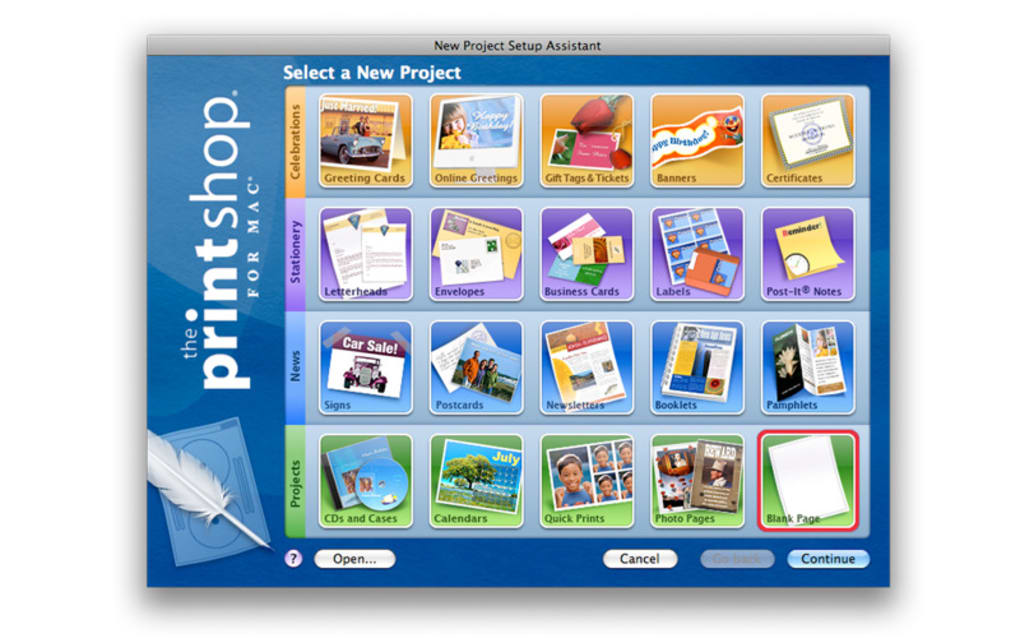
Once the wizard completes, you’re taken to the main dashboard, where the template gallery is front and center. Use the left‑hand navigation pane to filter templates by category (e.g., “Cards,” “Calendars,” “DVD Cases”). Selecting a template opens the layout editor, where the new Layout Palette provides alignment tools, ruler toggles, and grid visibility controls. Drag photos from the iPhoto pane or your desktop onto placeholders, double‑click text boxes to edit copy, and experiment with the Photo Workshop filters via the “Edit Photo” button.
When your design is ready, click the “Print” icon. The print dialog offers options for paper type, duplex printing, and “Nudge” alignment for labels. For digital output, choose “Export as PDF” or “Save as JPEG” from the File menu. The exported file retains all transparency and font information, making it ready for professional printing services if you prefer a higher‑quality finish.
Compatibility, Pros & Cons
Supported operating systems
The Print Shop is built for macOS 10.12 (Sierra) and later. It runs smoothly on Intel‑based Macs as well as Apple Silicon (M1/M2) thanks to Rosetta 2 translation where needed. While the software historically suffered compatibility issues on newer Windows builds, the macOS version has been consistently updated to work with the latest OS releases, including macOS Ventura and macOS Sonoma.
Pros
- Intuitive interface: Even first‑time users can create polished projects within minutes.
- Rich template library: Over 9,500 templates eliminate the need to start from scratch.
- Deep iLife integration: Direct import from iPhoto, iTunes, and iCal speeds up workflow.
- Built‑in Photo Workshop: Quick photo enhancements without leaving the app.
- Precise layout tools: Rulers, grids, and snap‑to features give professional‑grade control.
- Two‑sided printing & label‑free CD support: Reduces paper waste and printing costs.
Cons
- Not a full‑scale DTP solution—lacks advanced typography and CMYK color management.
- Limited to macOS; Windows users must seek older versions or alternatives.
- While the template set is massive, customization beyond the provided layouts can be restrictive for power users.
- Occasional performance lag when handling very large image files on older hardware.
Overall rating: 4 out of 5 stars – The Print Shop delivers a solid blend of ease‑of‑use and powerful features for the macOS creative market.
Frequently Asked Questions
Is The Print Shop compatible with the latest macOS versions?
Yes. Version 2 is regularly updated to support macOS Ventura, Sonoma, and future releases. The application runs natively on Intel and Apple Silicon Macs.
Can I use The Print Shop to create printable PDFs for a professional print shop?
Absolutely. The “Export as PDF” function embeds all fonts and transparency settings, producing a high‑resolution file suitable for commercial printing.
Do I need an iLife subscription to use the iPhoto and iTunes integration?
No additional subscription is required. The integration works with the native iLife apps that come pre‑installed on macOS.
Is there a free trial available?
Broderbund typically offers a 14‑day free trial that provides full access to all templates, fonts, and the Photo Workshop editor.
Can I print directly to CD labels without buying separate label sheets?
Yes. The Print Shop supports label‑free CD printing on compatible HP, Epson, and Canon printers, allowing you to print directly onto the disc surface.
Conclusion & Call to Action
For Mac users who want a fast, reliable, and visually rich desktop publishing solution, The Print Shop hits the mark. It blends an expansive template library, solid layout controls, and seamless iLife integration into a single package that feels both powerful and approachable. While it doesn’t replace high‑end DTP software for complex color‑critical work, it excels at everyday projects such as greeting cards, calendars, photo books, and custom CD/DVD packaging. If you’re looking to create professional‑looking printed materials without a steep learning curve, download The Print Shop today and start turning your ideas into tangible designs within minutes.
Download The Print Shop now and enjoy a 14‑day free trial that showcases all the templates, fonts, and Photo Workshop features you need to bring your creative projects to life.







